
By: Backwatch Technical Lead — fleet surveillance systems, 8+ years
Published: 2026-04-24 · Last updated: 2026-04-24
SD vs SSD vs HDD for MDVR is the question fleets ask after the first incident: missing footage because media failed. Incorrectly specified storage is the most common reason MDVR installs fail in the field — corrupt files, premature media death and unexpected downtime.
Consequences are practical and immediate: missing evidence after incidents, repeat maintenance costs, and vehicles off-route for repairs. You will read the same complaints on forums — “card corrupted overnight” and “this SD died after a few weeks.”
This guide gives a clear three-way comparison (SD, SSD, HDD), maps each option to vehicle types and duty cycles, and provides a short decision checklist plus a step-by-step install and maintenance process you can use today.
TL;DR:
If you need low cost and small installs, choose surveillance-grade microSD. For most fleet MDVRs that record continuously, choose a surveillance-grade SSD with vibration mount. Use HDD for high-capacity depot/archive only.
Quick decision checklist:
If yes to 2 or 3 → SSD. If extreme capacity and depot‑based → HDD + SSD cache.
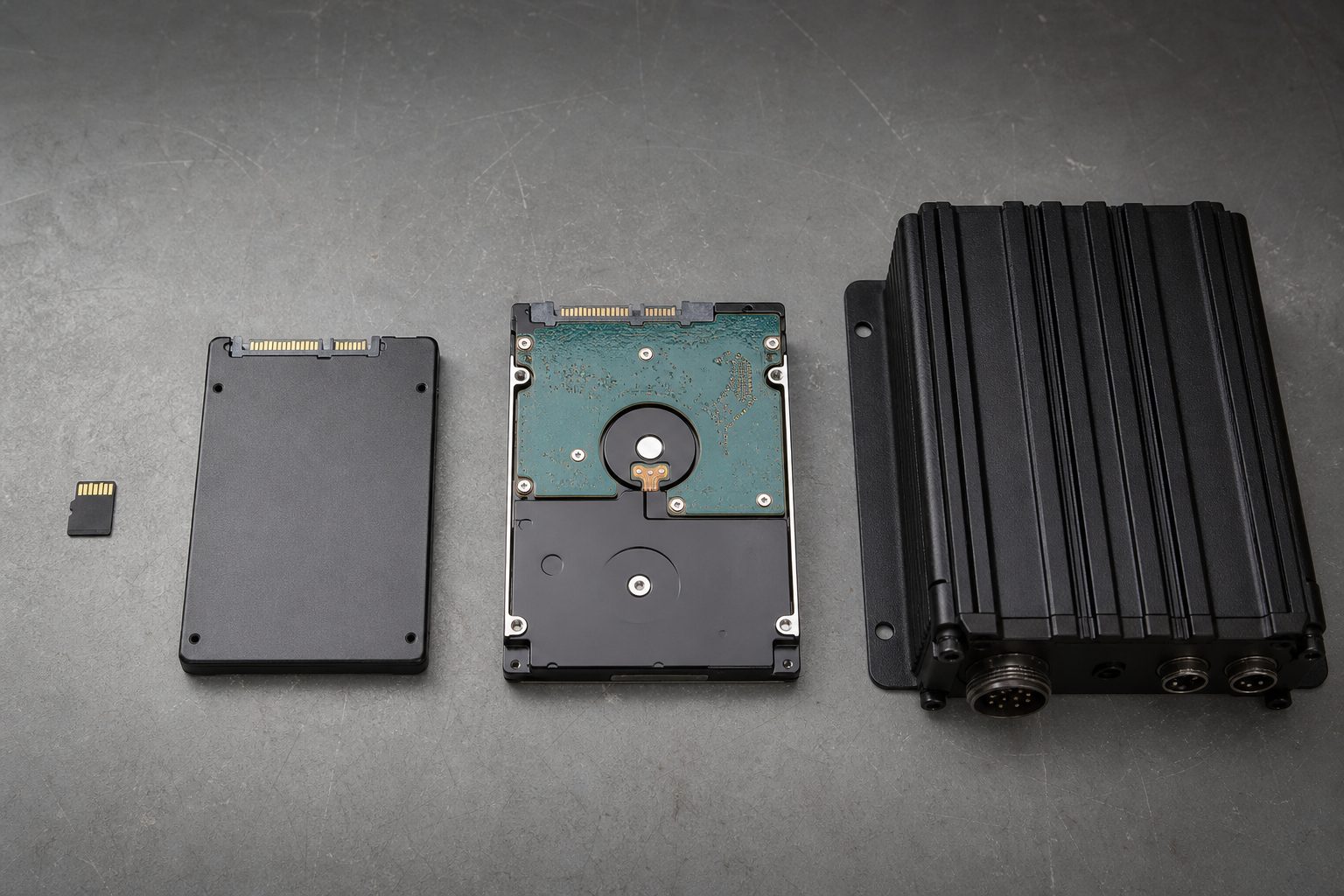
microSD / SD card — small removable flash memory available in consumer and industrial endurance grades. Vendors sell “high‑endurance” surveillance variants for continuous video.
MDVR implication: good for low-cost, single-camera installs or event-only recording; use surveillance-grade cards and expect higher management overhead.
SSD (Solid State Drive) — flash-based storage in 2.5″, M.2 or mSATA. Industrial SSDs include TBW ratings, SMART telemetry and power-loss protection.
MDVR implication: best balance for multi-camera continuous recording when mounted and monitored correctly.
HDD (Hard Disk Drive) — magnetic platters offering low cost-per-GB at larger capacities. Consumer HDDs are vulnerable to continuous vibration; surveillance-class HDDs are tuned for 24/7 workloads.
MDVR implication: cost-effective for depot/archival servers; use with strong damping or in stationary enclosures.
Operator note: removable cards make swapping easy but create more points of failure and chain-of-custody headaches.
MDVRs create a write-heavy workload: simultaneous camera streams, loop recording that overwrites oldest segments, frequent small metadata writes and indexing. That sustained write profile is what exhausts flash endurance and stresses mechanical drives.
Key mechanics to understand:
Worked example (concrete calculation): 4 cameras, 1080p, 4 Mbps average per camera, 24 hours.
Note: this is an example — actual bitrates vary by codec, motion and camera model. Use the calculator in Section 16 to adjust.
Operator paraphrase: “On long‑haul trucks the device writes for days — small SD cards don’t cope with the sustained writes.”
| Attribute | SD (microSD) | SSD | HDD |
|---|---|---|---|
| Typical form factors & mounting | Removable card / slot | 2.5″, M.2 — screw/mount | 2.5″/3.5″ enclosed box |
| Typical capacity ranges | 8 GB–512 GB | 128 GB–8 TB | 500 GB–18 TB |
| Cost per GB | Medium | Higher | Low |
| Sequential write performance | Low (endurance variants better) | High | Medium |
| Random write performance | Low | High | Low |
| Typical endurance (surveillance) | Fair (high‑endurance variants available) | Good (industrial Excellent) | Fair (surveillance HDDs better) |
| Vibration & shock resistance | Fair | Good | Poor (unless rugged) |
| Power consumption | Low | Medium | High |
| Noise | Silent | Silent | Audible (3.5″) |
| Removability / ease-of-swap | High (but lose rate up) | Medium (tools needed) | Low |
| Failure modes | Wear/corruption/counterfeit | Wear (TBW)/controller | Mechanical crash |
| Best use cases | Single cam, short retention | Multi-cam fleets, continuous record | Depot archival, high capacity |
Footnote: Ratings are generalized — product model and industrial/surveillance-class variants can change these outcomes.
Field reports (operator forums): many operators report “card corrupted overnight” and frequent replacements on cheap cards.
Operator tip:
Label cards by VIN & install date. If drivers swap cards, expect higher loss and stricter chain‑of‑custody processes.
| Checklist item | Minimum guidance |
|---|---|
| Type | Surveillance/high‑endurance microSD |
| Capacity | 32–128 GB for non‑parking; 128+ GB for parking mode |
| Temp rating | Industrial ranges if vehicles operate in extremes |
SSDs wear by program/erase cycles and are typically specified by TBW (Terabytes Written). Use SMART telemetry to monitor health: key metrics include Total Host Writes (or Bytes Written) and Percentage Used/Remaining Life. Recommended practice: set alerts and plan replacement when Remaining Life < 10% or when reallocated sectors/error counts rise above vendor thresholds.
Simple TCO concept: Total Cost = media cost + labour replacement cost + downtime cost. Example below is illustrative — update with vendor prices and local labour rates.
| Item | Example SSD | Example SD fleet (per vehicle) |
|---|---|---|
| Media cost | $150 (1 TB surveillance SSD) | $30 (128 GB high‑endurance card) |
| Replacements / 3 years | 0–1 | 3–6 |
| Estimated labour & downtime | $50 | $300 |
| Total 3yr (example) | $200–$250 | $420–$600 |
Example: SSDs are costlier up‑front but can reduce replacement and labour costs over 2–3 years; verify with your vendor pricing and labour rates.
Operator tip:
Installers report fewer returns when using surveillance‑grade SSDs with proper mounts — reduced maintenance often offsets higher media cost.
| Risk | Benefit |
|---|---|
| Sensitive to shock | Very low cost/GB |
| Requires damping | High capacity for long retention |
Hybrid patterns balance cost, durability and retention. Use the pattern that fits duty cycle and depot access.
Pattern 1 — SD-only
Best for: single-cam, low budget. Pros: low upfront cost, removable. Cons: limited retention, management overhead.
Pattern 2 — SSD-only
Best for: continuous multi-cam fleets. Pros: reliable writes, fast retrieval. Cons: higher cost per TB.
Pattern 3 — SSD cache + HDD archive
Best for: depot-based fleets needing long retention. Pros: SSD absorbs writes and protects HDD; HDD provides cheap long-term storage. Cons: added complexity and nightly offload procedures.
Pattern 4 — Edge + cloud offload
Best for: high-risk vehicles. Pros: cloud stores critical incidents if device is stolen. Cons: requires bandwidth and ongoing cloud costs.
Decision flow (text): Is vehicle on-road >18 hrs/day? → Yes: Use SSD or SSD+HDD. No: SD or HDD archive acceptable. Are drivers swapping media? → Yes: prefer fixed SSD to reduce lost cards.
Installer paraphrase: “Installers use SSD cache to avoid corrupted HDDs and then archive overnight when vehicle is in depot.”
| Vehicle / Use-case | Recommended storage (Best / Acceptable) | Rationale | Minimum spec | Replacement cadence |
|---|---|---|---|---|
| Rideshare / taxis | Best: SSD (fixed) / Acceptable: 128GB high‑endurance microSD | Drivers swap media and vehicles see high usage; SSD reduces lost cards and wear. | SSD 250GB surveillance / microSD 128GB high‑endurance | SD: 3–12 months (example); SSD: 24–36 months |
| Small delivery van | Best: SSD / Acceptable: SD for short routes | Moderate vibration; continuous writes on long routes. | SSD 500GB surveillance / microSD 64–128GB | SD: 6–12 months; SSD: 24–36 months |
| Urban bus | Best: SSD + HDD archive / Acceptable: SSD only | High capacity & retention needs; depot archiving works well. | SSD 1TB + HDD 4TB archive | SSD: 24–36 months; HDD: replace per SMART/annual |
| School bus | Best: SSD + cloud snapshot / Acceptable: SD for single camera | High safety requirements; prefer hardened storage and cloud for critical incidents. | SSD 500GB surveillance + cloud event upload | SSD: 24–36 months |
| HGV / long‑haul truck | Best: SSD (industrial) / Acceptable: SSD + periodic HDD offload | Long continuous runs and harsh vibration; endurance matters most. | SSD 1TB industrial (wide temp) | SSD: 18–36 months depending on TBW (example) |
| Law enforcement / emergency vehicle | Best: SSD (redundant) + cloud for critical events | High evidentiary requirements; redundancy and chain-of-custody important. | SSD 1TB surveillance + cloud retention | Replace per SMART/annual review |
| Depot / NVR archival server | Best: HDD array + SSD cache / Acceptable: HDD RAID | Large-capacity long-term retention best handled in depot. | HDD RAID 10 / SSD cache for ingest | Replace per SMART/annual and scheduled rebuilds |
If budget is tight: fallback to the Acceptable option for each scenario, but plan more frequent maintenance and testing.
Operator tip:
We learned the hard way — never take untested cards on a route. Run the above steps on each batch before fleet deployment.
| Myth | Reality & Action |
|---|---|
| “Cheap SD is fine — it’s just storage.” | Counterfeits and low endurance cause corruption. Action: buy surveillance/high‑endurance cards and verify seller. |
| “SSDs never fail.” | SSDs wear by TBW and can fail — monitor SMART and set replacement thresholds. |
| “HDDs won’t work in any vehicle.” | HDDs can work when mounted and damped properly; best for depot/low-shock vehicles. |
| “Cloud replaces local storage.” | Cloud is supplementary — dependent on bandwidth and cost; use for critical events, not full-time archive without investment. |
| “All microSD are the same performance-wise.” | Different classes and NAND types change sustained write and endurance. Action: check endurance rating. |
| “You don’t need graceful shutdown.” | Abrupt power loss causes corruption. Action: implement safe shutdown or power-loss protection. |
| Step | Deliverable | Responsible |
|---|---|---|
| Audit | Inventory CSV | Ops Manager |
| Pilot | Pilot report | Technical Lead |
Common friction: driver compliance on swapping and logging. Use tagging and painless, penalty‑free processes to improve compliance.
SSD is the right default for most continuous fleet MDVR deployments: it resists vibration, supports sustained writes better than consumer SD, and reduces maintenance. Surveillance-grade microSD is a reasonable low-cost choice for single-camera or short‑retention installs. Use HDDs for depot archival where capacity cost matters and mechanical risks are controlled.
Next steps: run the storage calculator (Section 16) with your camera counts and bitrates, pilot your chosen architecture on 5–10 vehicles, and follow the test-before-rollout procedure in Section 10.
Quick answer: It depends — SSD for most continuous fleet MDVRs; surveillance-grade SD for low-cost or single-camera setups; HDD for depot/archive.
Expanded: SSDs balance endurance, vibration resistance and retrieval speed for continuous multi-camera fleets. High‑endurance microSD cards are acceptable for short-retention or single-cam installs. HDDs offer cheaper long-term storage but are best used in depot or with SSD caching and strong damping. See Section 9 for scenario recommendations and Section 6 for SSD implementation.
Quick answer: Yes — if you choose surveillance-grade, high‑endurance cards and manage them.
Expanded: Consumer microSD cards often fail under 24/7 overwrite workloads. Use cards labelled “High‑Endurance” or vendor surveillance lines, format in-camera, rotate on a schedule, and monitor error logs. Replace cards proactively when error counts increase. See Section 5 for purchase and maintenance guidance.
Quick answer: Variable — governed by TBW and workload; typically 18–36 months in heavy-duty fleet use.
Expanded: SSD life depends on total bytes written and drive class. Monitor SMART metrics (Total Host Writes / Percentage Used) and set alerts (e.g., Remaining Life < 10%). Industrial SSDs with higher TBW and power-loss protection last longer under continuous writes. See Section 6 for monitoring and replacement thresholds.
Quick answer: They can; HDDs are sensitive to vibration and shock unless mounted and damped correctly.
Expanded: Frequent vibration, shocks and temperature cycling increase HDD failure risk. Use surveillance-class HDDs, 2.5″ models where possible, and shock‑absorbing enclosures. Mounted in spring-suspended, shock-absorbing holders, HDDs run dependably in vehicles and also suit depot archive duty; combine with SSD cache for mobile use. See Section 7 mitigations.
Quick answer: High‑endurance SD cards use NAND and firmware optimised for continuous write cycles and wear‑leveling — yes, use them for continuous or parking-mode recording.
Expanded: High‑endurance cards typically have better wear leveling, higher write-cycle tolerance, and vendor warranty terms that may cover constant video recording. They blunt the common failure modes of consumer cards in dashcams and MDVRs. See Section 5 for buying checklist.
Quick answer: Example: at 4 Mbps per camera, 24/7, expect ~169 GB/day; ~5.1 TB for 30 days (add overhead for indexing).
Expanded: Use the formula: daily_GB = (number_of_cameras * average_bitrate_Mbps * 3600 * hours_per_day) / 8 / 1024. For 4 cameras at 4 Mbps each, 24 hours: daily ≈169 GB, 30 days ≈5.1 TB; add 10% overhead for logs and indexing. Use the calculator in Section 16 for custom inputs.
Quick answer: You can, but consumer SSDs lack industrial firmware and power-loss protection — choose surveillance-rated SSDs where possible.
Expanded: Consumer SSDs may work in light workloads, but in heavy fleet duty they can wear out quicker or experience firmware issues. Prefer industrial/surveillance SSDs with TBW ratings, wide temp ranges, and power-loss protection. See Section 6 for selection and monitoring.
Quick answer: Cloud is useful for critical event backup, not for full continuous archive unless bandwidth and budget allow.
Expanded: Cloud saves footage if devices are stolen and is good for central incident access. However, continuous upload of multiple cameras consumes bandwidth and cost. Use cloud for event clips and urgent footage; rely on local storage for full retention. See Section 8 for hybrid patterns.
Quick answer: Replace surveillance-grade SD cards proactively every 6–12 months in heavy use; adjust based on error logs and usage.
Expanded: Replacement cadence depends on duty cycle. For continuous 24/7 recording or parking mode, expect shorter lifetimes (6 months typical in heavy-duty scenarios). Monitor device error counts and consider scheduled replacement or rotation. See Section 5 for operational best practices.
Quick answer: 128GB high‑endurance microSD per vehicle, with a central nightly offload or manual export for incidents.
Expanded: For cost-sensitive small fleets, surveillance-grade 128GB microSD cards give reasonable retention for short routes and low complexity. Ensure regular card rotation and backups. If routes are long or vehicles run 24/7, consider upgrading to SSDs for lower long-term OPEX. See Sections 5 and 9 for scenario guidance.
Use this free checklist to audit current storage, choose the right media (SD, SSD or HDD) for each vehicle type, and roll out your MDVR storage upgrade in 12 structured steps.
Tell us what vehicles you run and what you need — we will come back with a recommendation and a price. Prefer to talk? Call 01656 721871.
4 August 2026
Monday to Friday:
8.30am-5.30pm

